
From a week to a day: Hundreds of banner resizes with AI-plugin
Our team regularly scales ad campaigns into hundreds of formats and languages for global brands, and used to handle every round of resizing by hand. An in-house AI plugin for Figma took over the repetitive part of resizing and cut the cost of a batch by 2–5x, leaving designers only the creative work.
The problem
The classic performance-marketing loop looks the same for almost any brand: generate a batch of hypotheses, test them, then scale the winners. But scaling means two different things — growing the number of hypotheses, and expanding a single hypothesis into dozens or hundreds of placement formats. In practice, it's the second kind that breaks down.
A single campaign could resize into 700–900 formats across several languages at once. Getting from an approved idea to a live campaign typically took anywhere from a few days to a full week.
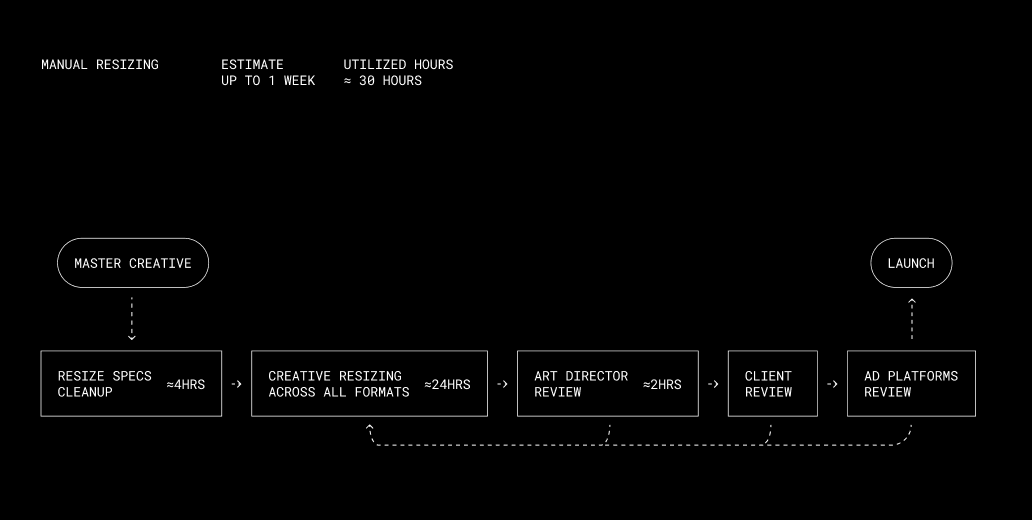
The solution: an AI plugin for Figma
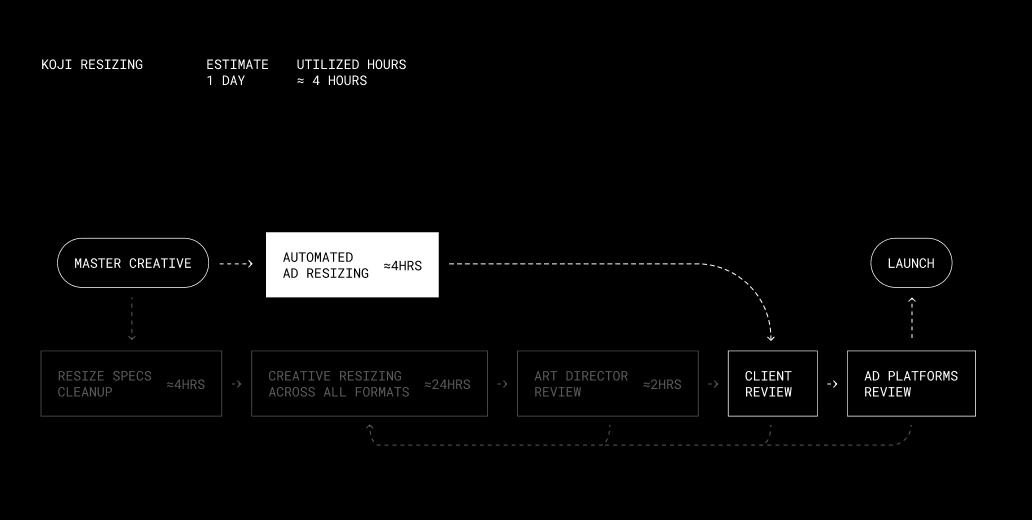
The team built its own AI plugin for designers that runs inside Figma and mass-produces creative variants. What used to be a 10-step chain of handoffs and approvals is now 3 or 4: build the master banner, generate the resizes, get one round of client sign-off, and export. Within 2–3 hours the client has a package of 200–300 resizes ready to send to platforms.
Follow-up comments from ad platforms are now rare: recurring technical details — disclaimer contrast and text height, whether a banner needs a border, file weight in kilobytes, and similar requirements that used to be negotiated format by format — are already built into the engine of plugin.
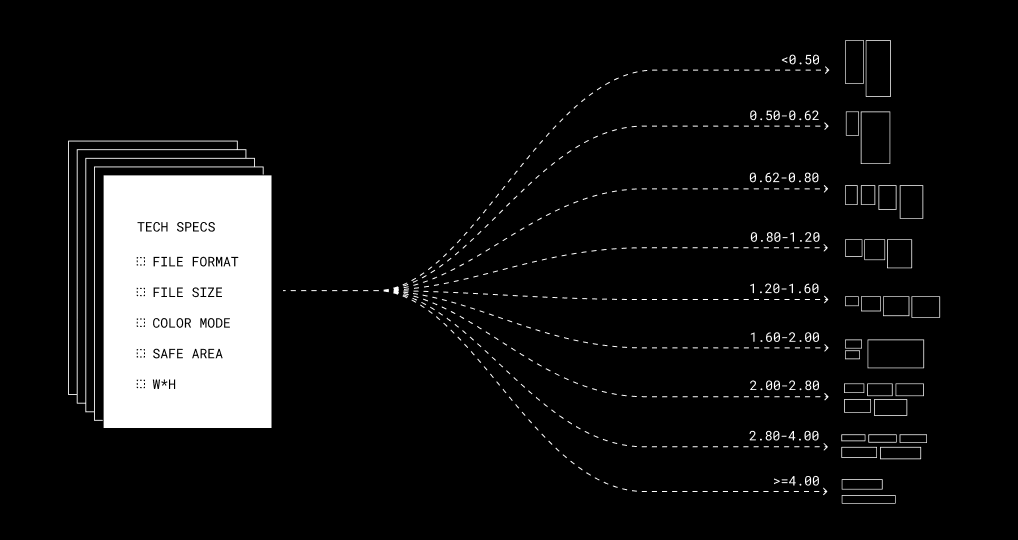
Step 1: Cluster the formats
The plugin reads every technical spec across scattered files and groups formats by proportion — tall vertical banners, near-square formats, wide horizontal banners, and extra-narrow horizontal strips — collapsing hundreds of raw specs into 5–8 clusters.
Step 2: Build one master creative per cluster
Designers manually build 5–8 master banners, one for each cluster. This is the only step that still requires creative judgment — everything downstream is automated.
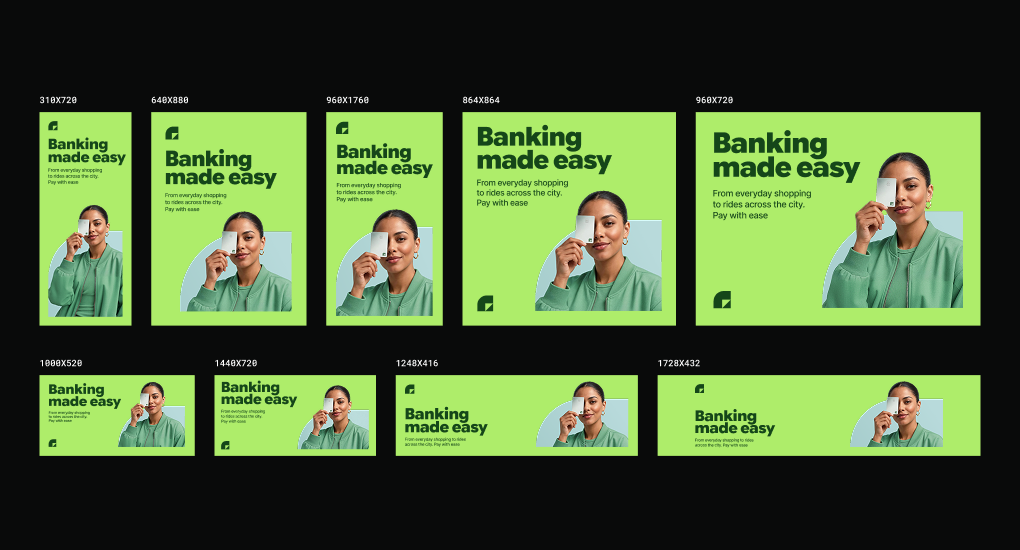
Step 3: Generate and export the full batch
One click turns the 5–8 master banners into 200–300 resizes. On export from Figma, the plugin automatically creates folders and names each file by platform, placement city, and pixel dimensions.
After the first run, manual QA is barely needed — once a brand's and platforms' rules are baked into the templates, later batches ship without extra double-checking.
The results
Turnaround for a single batch dropped from a week to a day, and actual team time from roughly 30 hours to about 4. The number of hypotheses the team can test per month no longer depends on production capacity at all — it's now limited only by how many hypotheses the marketer can generate, which the team estimates could mean up to a 10x speed-up.
| Approach | Turnaround time | Utilized hours | Pricing basis |
|---|---|---|---|
| Manual resizing | up to 1 week | ≈ 30 hours | Number of deliverables × price per 1 unit |
| KOJI Plugin | 1 day | ≈ 4 hours | Time on master banners + automated output |
Budget for scaling drops 2–5x from the baseline, and the effect grows with volume: the 5x end of that range shows up only when many campaigns move through the pipeline, not on a single small batch.
Results
Budget for scaling drops 2–5x from the baseline
1 day
Turnaround time
4 hours
Actual team time

Pasha Dergachev
If your team produces
creatives at volume and feel the squeeze between cost, speed, and brand consistency, KOJI can help. Book a 15-minute call.